
Business · 9 min read
Website Speed Matters More Than You Think: How Load Time Kills Conversions
Slow pages lose customers before they ever see your offer. How load time affects conversions and rankings, and what to actually do about it.

Share

Key takeaways
- Slow load times reduce conversions because visitors leave before the page renders, and many bounce before analytics even records them.
- Major published studies from Google, Akamai, Walmart, and the BBC all point the same direction: faster pages keep more people and convert better.
- Google uses Core Web Vitals (LCP, INP, CLS) as a ranking factor, so a slow site can lose both conversions and search visibility.
- Common causes of slow sites are unoptimized images, too many plugins, cheap shared hosting, render-blocking code, weak caching, and bloated page builders.
- Quick fixes work when the foundation is sound; outdated themes, bloated builders, and weak hosting usually need a rebuild instead.
Website speed kills conversions because slow pages make visitors leave before they ever see your offer. Most business owners never check their load time. They assume that if the site loads, it is fine. But customers feel every extra second, and they will not tell you the site is slow. They will just leave, and you will never know they were there.
The connection between speed and revenue is not theoretical. Some of the largest companies on the web have published research on it, and the pattern holds across every industry: slower sites make less money. Here is what that research says, and what you can actually do about it.
How does website speed affect conversions?
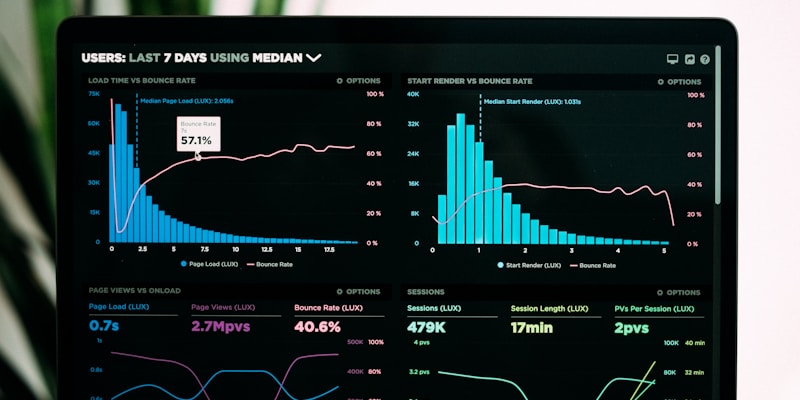
Website speed affects conversions because load time acts as a filter. Every second a page takes to appear, more visitors abandon it before the content renders, and an abandoned visit cannot convert.
Several widely cited studies make the point. Google's research found that more than half of mobile visitors abandon a page that takes longer than three seconds to load. Akamai has reported that small increases in load time correlate with measurable drops in conversion. Walmart found that improving load time tracked with higher conversions, and the BBC reported losing a share of users for each additional second their pages took to load.
The exact figures vary by site and study, and you should be skeptical of anyone quoting them to the decimal as if they apply to your business. The point is not the precise number. The point is the direction, which is consistent everywhere: faster pages keep more people, and the people you lose to slow loading are not abstract "traffic." They are visitors who searched for what you sell, clicked your link, and left because the page could not keep up. Many of them bounce before analytics even records them, so the loss is real but invisible in your reports.
Why does Google penalize slow websites?
Google penalizes slow sites because page speed is a confirmed ranking factor through Core Web Vitals, a set of metrics that measure the real-world experience of using your site. Speed does not only cost you conversions directly, it can also cost you the ranking that brings visitors in the first place.
Three Core Web Vitals matter most:
- LCP (Largest Contentful Paint) measures how long it takes for the main content to become visible. If your hero image or headline takes several seconds to appear, Google treats that as a poor experience. Aim for under 2.5 seconds.
- INP (Interaction to Next Paint) measures how quickly the site responds when someone clicks a button, taps a menu, or fills out a form. INP replaced the older First Input Delay metric. Aim for under 200 milliseconds.
- CLS (Cumulative Layout Shift) measures visual stability. If you have ever gone to tap a button and the page jumped, making you tap an ad instead, that is layout shift. Aim for a score under 0.1.
Since Google's Page Experience update, these metrics influence search rankings. In plain terms: if your site is slow and a competitor's is fast, the faster site has an advantage, even when your content is better. If you have not audited your site against these metrics recently, our SEO checklist for 2026 covers the ranking factors that matter now, and our performance audit guide walks through measuring them.
What usually makes a website slow?
Website slowness rarely comes from one source. It compounds. A slow host here, an unoptimized image there, a bloated plugin somewhere else, and a two-second site quietly becomes a six-second site. These are the usual culprits we see when auditing slow sites:
- Unoptimized images. This is the most common offender by far. An uncompressed hero image can run several megabytes on its own. Most images should be served in WebP or AVIF, sized correctly, and lazy-loaded below the fold.
- Too many plugins and scripts. Every plugin adds JavaScript and CSS the browser must download, parse, and run. The analytics tag, the chat widget, the social buttons, the popup builder, each one adds weight, and they stack up fast on WordPress sites that accumulate plugins over the years.
- Cheap shared hosting. On a budget shared plan you share a server with many other sites. When one of them spikes in traffic, your site slows down. Cheap hosting is often one of the more expensive mistakes a business makes.
- Render-blocking CSS and JavaScript. Some files block the page from rendering until they finish downloading. If yours are not deferred or minified, the browser waits instead of showing content.
- No caching strategy. Without caching, the server rebuilds the page from scratch for every visitor instead of serving a prepared version. Browser, server-side, and CDN caching should all be in place.
- Bloated page builders. Builders like Elementor, Divi, and WPBakery generate large amounts of nested HTML, inline CSS, and JavaScript. A page that should be lightweight ends up many times heavier, trading drag-and-drop convenience for slower loads.

If any of this sounds familiar, the page builder point especially, it is worth understanding the real performance cost of DIY website builders before you assume the convenience is free.
Can a good-looking website still be fast?
Yes. Speed and design are not a real trade-off, and the belief that a beautiful site must be a slow one is a myth that costs businesses money.
Modern web development solved this. Frameworks like Next.js, well-built WordPress, and purpose-built platforms deliver strong design and fast performance at the same time. The only reason a beautiful site is slow today is that it was built without performance as a priority. A performance-first approach in practice looks like:
- Image optimization. Serve modern formats, compress without visible quality loss, and size images for the device. A phone does not need a 4000-pixel-wide hero.
- Lazy loading. Load images and video only as they are about to scroll into view, rather than downloading the whole page up front.
- A CDN. Serve assets from servers physically close to each visitor, so someone far from your origin server is not waiting on a long round trip.
- Server-side rendering and static generation. Pre-build pages so the server sends finished HTML instead of making the browser assemble everything with JavaScript.
A well-built site should score strongly on Google PageSpeed Insights on both mobile and desktop. If yours does not, the problem is not that performance is impossible alongside good design. It is that performance was not built in from the start.
How do you check your website speed?
You do not need to be a developer to diagnose speed problems. Three free tools cover it:
- Google PageSpeed Insights scores mobile and desktop and uses real Chrome user data, so it reflects what actual visitors experience.
- GTmetrix gives a waterfall chart showing exactly what loads, in what order, and how long each piece takes.
- WebPageTest is the most technical of the three and lets you test from different locations and connection speeds.
Here is what good, mediocre, and poor Core Web Vitals scores look like:
| Metric | Good | Needs improvement | Poor |
|---|---|---|---|
| LCP | 2.5s or less | 2.5s to 4.0s | Over 4.0s |
| INP | 200ms or less | 200ms to 500ms | Over 500ms |
| CLS | 0.1 or less | 0.1 to 0.25 | Over 0.25 |
If your LCP is above 4 seconds, your INP above 500 milliseconds, or your CLS above 0.25, Google categorizes the page as a poor experience and ranks it accordingly. Even the "needs improvement" range means you are leaving performance, and revenue, on the table.
When does a slow website need a rebuild instead of quick fixes?
A slow site needs a rebuild when the foundation is the problem rather than the details. Sometimes targeted optimizations are enough; sometimes no amount of tuning fixes a broken architecture.
Quick wins are usually enough when the underlying site is reasonably well built. Compressing existing images and converting them to WebP can cut page size substantially. A well-configured caching plugin like WP Rocket reduces server response time by serving prepared pages. A CDN such as Cloudflare, which has a generous free tier, cuts load times for distant visitors. On a clean theme with decent hosting, these can move a middling score up to a strong one.
A rebuild is the right call when the architecture itself is the bottleneck. The signs:
- The site runs on an outdated theme that has not been updated in years.
- It is built on a bloated page builder generating excessive code.
- It sits on cheap shared hosting that throttles during peak traffic.
- It has accumulated dozens of plugins, many no longer used.
- The mobile PageSpeed score stays very low even after basic optimization.
In those cases, band-aids do not hold. The only real fix is to rebuild on a performance-first foundation, which is what we bake into every project at Studio Aurora.

When weighing the cost of a rebuild, think in terms of return. A meaningful lift in conversion rate applies to all the traffic you are already paying to acquire, and it compounds with the SEO gains and lower bounce rate that come with speed. The investment tends to pay back faster than business owners expect.
Make speed a competitive advantage
Your website speed is either earning you money or quietly costing it, with little in between. Every second of load time filters out paying customers before they see what you offer, and the slower the site, the harder it filters.
The research from Google, Walmart, the BBC, and Akamai all points the same direction: speed is not a technical footnote, it is a business metric. The businesses that treat it that way, investing in proper hosting, clean code, optimized assets, and modern architecture, are the ones converting the visitors everyone else is losing.
If your site lags on PageSpeed Insights, that is a fixable problem and a worthwhile one. Book a call with Studio Aurora and we will tell you honestly whether you need a few targeted fixes or a rebuild.
Related service
Web design services in the PhilippinesFrequently asked questions
Why does website speed affect conversions?
Website speed affects conversions because load time acts as a filter. The longer a page takes to appear, the more visitors abandon it before the content renders, and an abandoned visit cannot convert. Many visitors leave before analytics even records them.
What are Core Web Vitals?
Core Web Vitals are Google metrics for real-world user experience. The three that matter most are LCP (how fast the main content appears), INP (how quickly the site responds to input), and CLS (how stable the layout is while loading).
What usually makes a website slow?
The most common causes are unoptimized images, too many plugins and scripts, cheap shared hosting, render-blocking CSS and JavaScript, no caching strategy, and bloated page builders that generate excessive code.
Can a good-looking website still be fast?
Yes. Speed and design are not a real trade-off. Modern techniques like image optimization, lazy loading, CDNs, and server-side rendering let a visually premium site also load fast. A slow, beautiful site usually was not built with performance as a priority.
When does a slow website need a rebuild instead of quick fixes?
A rebuild is needed when the foundation is the problem: an outdated theme, a bloated page builder, weak shared hosting, dozens of accumulated plugins, or a mobile PageSpeed score that stays very low even after basic optimization.
Slow site costing
you customers?
We build fast, conversion-focused sites. Let's see where yours is losing people.
Get in touchPillar guideDevelopment · Feb 26
Core Web Vitals Optimization: A Practical Guide to Google’s Page Speed Benchmarks
Resources · Apr 15
Monitoring Website Uptime: Tools and Strategies to Prevent Revenue-Killing Outages
Resources · Apr 14
Website Caching Strategies: Browser Cache, Server Cache, and CDN Cache Explained
Resources · Apr 5