
Development · 7 min read
Why Your Website Speed Is Killing Your Revenue (And What to Actually Do About It)
Website speed is one of the most measurable factors in whether your site earns business. Here is what fast means in 2026 and how to fix a slow site.

Share

Key takeaways
- Slow load times raise bounce rates and cut conversions; Google found bounce probability rises 32% from one to three seconds.
- Google judges speed through three Core Web Vitals: LCP for loading, INP for responsiveness, and CLS for layout stability.
- Most sites feel fast on office WiFi but perform poorly for the majority of Philippine visitors on mobile networks.
- Common speed killers are unoptimized images, too many third-party scripts, bloated page builders, and cheap shared hosting.
- Real fixes include auditing mobile score, optimizing images, deferring scripts, better hosting, and a performance-first build.
"Your website needs to be fast" gets filed away with other vague advice like "post more on social media." But speed is not vague. It is one of the most measurable factors in whether your site earns business or quietly loses it, and for Philippine businesses where most visitors arrive on a phone over mobile data, it matters more than almost anywhere.
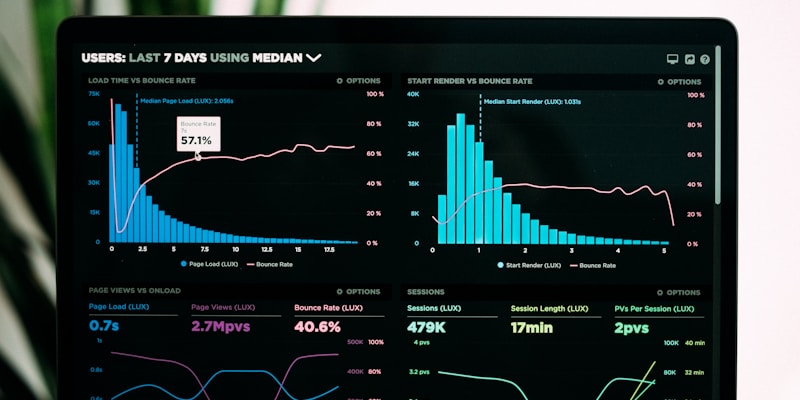
Website speed is how quickly your pages load and become usable, and it directly shapes how many visitors stay long enough to become customers. Google's own research found that as page load time grows from one second to three seconds, the probability of a visitor bouncing rises by 32 percent, and at five seconds it climbs to about 90 percent. That is not a gentle slope, it is a cliff. This guide explains what "fast" actually means in 2026, why most business sites are slower than their owners think, and what to actually do about it.
What does "fast" actually mean in 2026?
Fast in 2026 is defined by Google's Core Web Vitals, three metrics that measure how a page actually feels to use and that feed directly into search ranking. Speed is no longer just "how long until the page finishes," it is how quickly content appears, how fast the page responds to a tap, and how stable it stays while loading.
Largest Contentful Paint (LCP) measures how long the largest visible element, usually a hero image or heading, takes to render. Google considers under 2.5 seconds good and over 4 seconds poor, and many template-built sites sit around 3.5 to 6 seconds on mobile, squarely in penalty territory. Interaction to Next Paint (INP), which replaced First Input Delay in 2024, measures responsiveness when someone clicks a button or submits a form, with under 200 milliseconds considered good. Cumulative Layout Shift (CLS) measures how much the page jumps around as it loads, the maddening effect where text shifts just as you go to tap it; the target is a score under 0.1. These are not abstract benchmarks. They decide where you rank and whether visitors stay.
Why are most business websites slow without the owner knowing?
Most business owners think their site is fast because it loads quickly on office WiFi in a cached browser, which is nothing like the experience their customers have. In the Philippines, the majority of visitors arrive on mobile, often on cellular connections that are slower and less stable than an office network, so the real-world speed is far worse than the owner ever sees.
A handful of culprits cause most of the slowdown. Unoptimized images are the biggest: a single uncompressed hero image can be several megabytes, and a homepage stacked with sliders and photos can force visitors to download a huge payload before they read a word, when modern formats like WebP and AVIF could cut that by half or more. Too many third-party scripts pile on next, since analytics, chat widgets, social embeds, fonts, and cookie banners each add code that blocks rendering, and it is common to find dozens running on a single page. Bloated drag-and-drop builders like Elementor and Divi generate far more HTML and CSS than the design needs, so a section that should be twenty lines of clean code becomes hundreds. And cheap shared hosting puts your site on a server crowded with hundreds of others, so server response time alone can exceed 800 milliseconds before any content even starts loading.

How does slow speed hurt your search ranking?
Slow speed pushes you down in search results, and the damage is easy to miss. Google has used page speed as a ranking factor since 2010, and its weight has grown with the Core Web Vitals update, so a slow site hands its position to faster competitors. The trap is that there is no alert when it happens: a page that slips from the first results page to lower down just brings in less organic traffic over time, and you are left wondering why the inquiries dried up. The technical SEO fundamentals that drive rankings in 2026 all assume performance as a baseline.
How much does speed affect conversions?
Speed has a direct, measured effect on whether visitors convert, not just whether they stay. A widely cited 2024 conversion study by Portent found that conversion rates fall sharply as load time grows:
| Load time | Average conversion rate | Bounce rate |
|---|---|---|
| 1 second | 3.05% | 7% |
| 2 seconds | 1.68% | 11% |
| 3 seconds | 1.12% | 24% |
| 5 seconds | 0.64% | 38% |
| 10 seconds | 0.14% | 65% |
Source: Portent, 2024 website conversion study.
The pattern is the point: the conversion rate at one second is roughly five times higher than at five seconds. Whatever your traffic, a faster site converts a larger share of it, which is why speed is one of the cheapest levers most businesses have for getting more out of the visitors they already attract.
How do you actually fix website speed?
You fix speed with deliberate decisions about how the site is built and hosted, not by installing a caching plugin and hoping. Start by auditing, then fix in order of impact, which is the same approach we bake into every Studio Aurora build from the ground up.
- Audit first. Run your site through Google PageSpeed Insights and read the mobile score, not desktop, since mobile is what Google indexes and where your visitors are. Below 70 needs work, below 50 is urgent.
- Optimize every image. Convert images to WebP or AVIF, lazy-load anything below the fold, and serve responsive sizes with srcset so phones download smaller files. On image-heavy pages this alone can cut load time substantially.
- Reduce and defer JavaScript. Audit every third-party script, remove anything you cannot justify, and defer the rest so they stop blocking the initial render.
- Upgrade your hosting. Moving from crowded shared hosting to a modern managed host or cloud setup with a built-in CDN often removes seconds of delay for a modest monthly cost.
- Consider a performance-first rebuild. Sometimes the cheapest long-term fix is rebuilding on a modern stack like Next.js or Astro that produces fast static pages by default. A custom-built site designed for performance starts fast and stays fast instead of needing constant patching.

Speed compounds
Speed is not a one-time fix, it is a compounding advantage. Faster sites rank higher, which brings more traffic, which generates more business, which funds further improvement. Slow sites spin the opposite way: weaker rankings, less traffic, less budget to fix the cause. Every day your site loads slowly, you pay a tax in lost conversions, lower rankings, and visitors who picked a competitor whose page opened first.
The question is whether you keep paying that tax or fix it. If you want a straight assessment of how your site performs on real mobile connections in the Philippines and what it would take to make it fast, book a call or see how we approach it on our web design services page.
Related service
Web design services in the PhilippinesFrequently asked questions
Why does website speed affect revenue?
Slower pages raise bounce rates and lower conversion rates. Google's research found bounce probability rises 32% as load time goes from one to three seconds, and a 2024 Portent study found conversion rates fall sharply as pages get slower.
What Core Web Vitals does Google measure?
Google measures Largest Contentful Paint for how fast the main content appears, Interaction to Next Paint for how responsive the page is to taps and clicks, and Cumulative Layout Shift for how stable the layout stays while loading.
Why should I test mobile speed instead of desktop speed?
Mobile is what Google uses for indexing, and in the Philippines most visitors arrive on phones over slower, less stable cellular connections. A site that feels fast on office WiFi can be far slower for real visitors.
What are the biggest causes of a slow business website?
The most common causes are unoptimized images, too many third-party scripts, bloated drag-and-drop page builders that generate excess code, and cheap shared hosting with slow server response times.
What should I do first to fix website speed?
Start with an audit using Google PageSpeed Insights and read the mobile score, not desktop. A score below 70 needs work and below 50 is urgent, which tells you where to focus first.
Slow site costing
you customers?
We build fast, conversion-focused sites. Let's see where yours is losing people.
Get in touchPillar guideDevelopment · Feb 26
Core Web Vitals Optimization: A Practical Guide to Google’s Page Speed Benchmarks
Resources · Apr 15
Monitoring Website Uptime: Tools and Strategies to Prevent Revenue-Killing Outages
Resources · Apr 14
Website Caching Strategies: Browser Cache, Server Cache, and CDN Cache Explained
Resources · Apr 5